Above L. to R. — Dale Hamilton, Nick Hamilton, Casey Lewis, Aleesha Chavez — all of Northwest Nazarene University.
A group from Northwest Nazarene University is working on systems using artificial intelligence to analyze data collected by drones to map wildfires and determine fire effects.
We filmed this interview in a room where exhibits were being installed at the Fire Continuum Conference in Missoula, Montana the week of May 21, 2018.
At least five very large fires are currently active in the United States:
Gap in northern California,
Pioneer in central Idaho,
Maple in Yellowstone National Park,
Soberanes on the central coast of California, and,
Beaver Creek in northern Colorado and southern Wyoming.
Below we have progression maps of these fires (in that order).
We recently found out about a new website that has developed a very impressive mapping service for wildfires. It was the source of these maps. The site not only shows the locations, but in some cases for large fires it displays the perimeters — which can be animated to see the growth or progression of the fire over time. They have this information going back to 2003. It is on the EcoWest website and was created by a collaboration of the Sea to Snow company and the Bill Lance Center for the American West at Stanford University.
The perimeter data is dependent on what is made available by the agencies managing the fire, so there is not always a perimeter for every day.
You can minimize the Description box by clicking the down arrow at the top-right of the box.
(Update Sept. 22, 2020: the data from EcoWest previously posted below is no longer available.)
The Federal Emergency Management Agency is now using the United States National Grid (USNG) as its standard geographic reference system and is encouraging its use among their partners. The agency will use the USNG for deployment and tracking of resources, in their Incident Action Plans, and in NIMS-related programs, guidance, and training. FEMA will encourage all fire departments to use it and the system will be included in the curriculums at the National Fire Academy.
The USNG is a system for describing the location of a place on Earth. You can also use longitude and latitude, or Section, Township, and Range, or one of many other systems. The advantage of USNG is that it is very user friendly. If you know the general location already, for example on a particular wildfire, the location can be communicated with only six digits. It is far easier than using degrees, minutes and seconds, twice — for longitude and then again for latitude.
So with the thought that the wildland fire agencies will eventually begin using the USNG, I starting looking around for inexpensive, user friendly apps for smart phones.
First I looked for an app that could take a photo and automatically superimpose the location on the image in the USNG format. This can be very useful for firefighters to document conditions, conduct investigations, or to send near-real time intelligence to the Incident Command Post or dispatch offices. It could be especially handy for airborne firefighters.
I found that Solocator could meet the criteria, but the standard version, at $0.99, required an additional in-app purchase of $2.99 to enable the use of the USNG, raising the total cost to about $4. Not a huge sum, but $3 more than I expected to spend. If you don’t need the USNG, you can get by for $0.99.
It is a powerful app with many features and is user friendly except for the fact that to get to the settings, you have to swipe left or right from the page you see when you open the program. And there is no indication anywhere in the app, in the description in the app store, or on the developer’s web site that you have to swipe to see the settings.
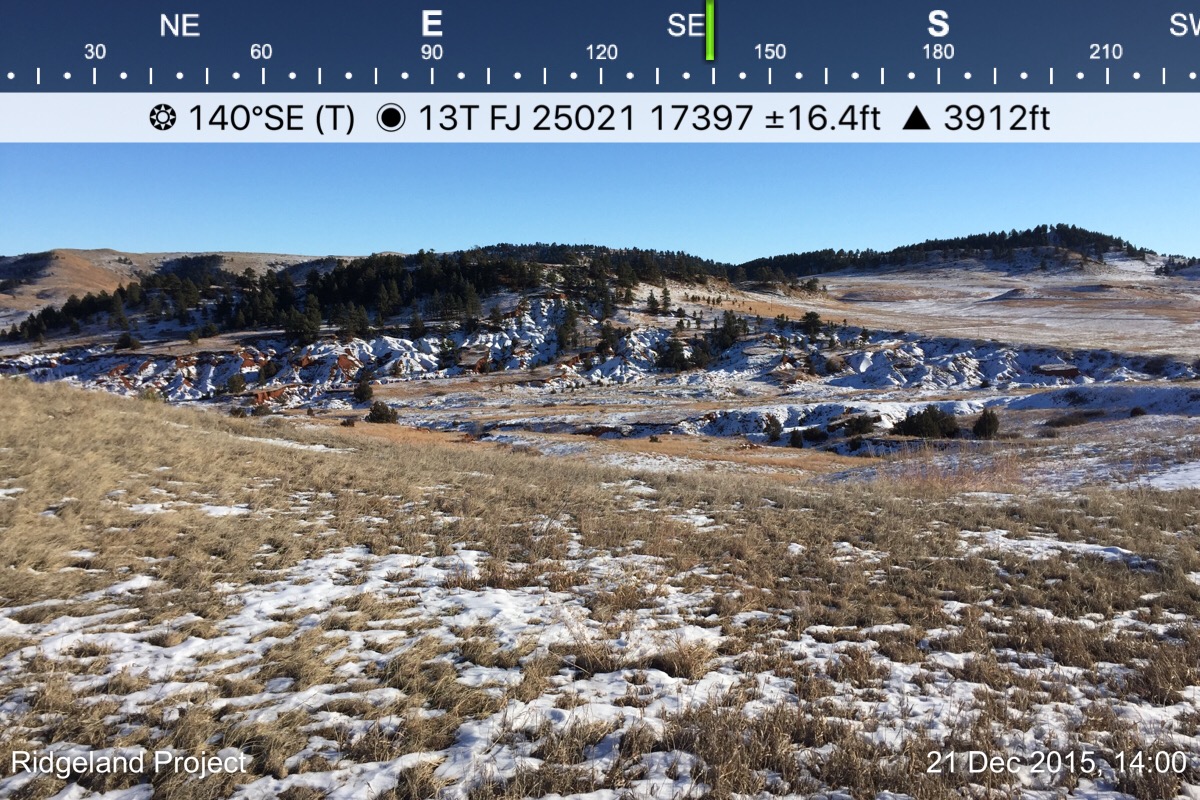
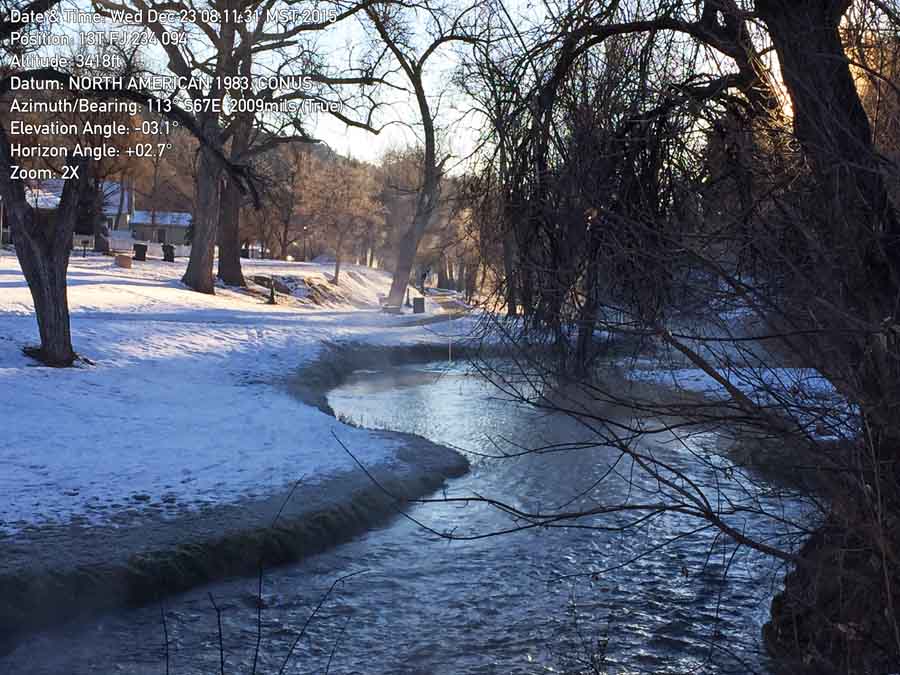
As seen in the image below, you can place on a photo taken with the app the location (using one of many location systems), the direction the camera was facing, elevation, date, and time. The photo below has the location in USNG format, in this case beginning with 13T which is the zone that includes parts of SD, ND, CO, MT, WY, and NE. (National map with grid zones.) You can optionally include a watermark on each photo at the bottom-left, which could be the name of the fire or project, in your choice of three colors for the text. The app produces two images: one with the data and one with no visible data.
The photos you take can be emailed directly from the app.
If a hotshot crew needs air support quickly, they don’t want to fumble around with a cumbersome app — they just want the six digits as quickly as possible.
I looked for a mapping app with:
GPS,
maps that can be viewed without internet coverage,
USNG,
navigation, and
the ability to determine the size of a polygon (or fire).
MilGPS
There are a crap ton of apps that are built around GPS, and browsing through them is overwhelming.
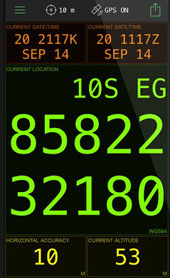
I looked at MilGPS which displays your location in HUGE characters. This would be excellent for just getting your coordinates so they can be passed on to someone else. But the app does not have off-line map capability, and I don’t believe it can determine acreage. It is also a little on the pricey side, at $10. I didn’t purchase it.
I downloaded Avenza PDF Maps, which is much cheaper: $0.00. It comes with no maps, but there are hundreds (thousands?) of maps that can be installed, with many of them being free, such as USGS topographical maps and U.S. Forest Service Motor Vehicle Use Maps, all of which can be downloaded directly from the app. (UPDATE 12/24/2015: As Robert pointed out, PDF Maps is only free for personal use. Any commercial, governmental, academic or other non-personal use requires the purchase of a commercial license.)
I was hoping to find a mapping tool that could determine acreage by automatically recording your location as you walked around a fire, but I don’t believe PDF Maps can do this. It appears that as you walk you have to periodically push a button to find your location and then another button to record that point. The more points you record, the more accurate the result. You can also stand in one place and move the crosshairs over the map and record points to measure an area — a method that would be less accurate than walking the perimeter, but it’s a quick and dirty method of coming up with an acreage figure.
PDF Maps meets all five of the requirements listed above. I have a feeling that many wildland firefighters use this app, and hopefully they can correct me if I’m wrong and provide more details about their experiences.
There are probably many other apps that can perform these functions. There might even be one that can take photos like Solocator AND meet the five mapping requirements.
Let us know in a comment what apps you use for mapping and photo documentation — and what you like and don’t like about them.
UPDATE, December 23, 2015: At Al’s recommendation, we tried out another photography program, Theodolite. The data on the screen does not eat up as much real estate as Solocator, but we could not find a way to put a note or watermark on the photo, such as the name of a fire or project. At iTunes it is priced today at $5.99, which is 40 percent off the regular price. The app can display the location in numerous formats, including USNG with 10, 100, or 1,000 meter precision.
Photo taken with Theodolite, at the Fall River by Bill Gabbert.
One of the presentations last week at the International Association of Wildland Fire conference, “Managing Fire, Understanding Ourselves”, concerned additional lessons that could be learned from the 19 fatalities on the 2013 Yarnell Hill Fire. Specifically, use of the term “MAYDAY” and the National Grid mapping system.
Most of the following presentation was prepared by Al Studt, of Cape Canaveral Fire and Rescue. It was presented at the conference by wildland fire consultant Richard McCrea. It is used here with their permission.
To view the slides, click the triangular play button and allow them to automatically advance every 10 seconds, or manually click the right arrow when you want to view the next slide.
— USFS Fire-California (@R5_Fire_News) November 20, 2013
Being fond of maps, I had to check it out. The link takes you to a USFS website where they advise you to download an app for your smart phone or tablet. For Apple users go to iTunes and search for “Avenza PDF Maps”. At the Google Play Store for Android folks it is named “PDF Maps“. The app is free.
While there are many ways to obtain digital maps, one advantage of this system is that you don’t have to have a connection to the internet to use it. If you’re out of cell phone coverage and your device has a GPS receiver, it can pinpoint your location on the georeferenced map, but you have to download the maps first.
Since the USFS was promoting their maps on this app we checked to see what is available. They are sorted by region number. If you don’t know the number of the region you’re interested in, you will have great difficulty finding the map you need. Only three USFS regions have any maps listed. Their Northern Region, Region 1, has five, and they are all Motor Vehicle Use maps (MVU). The MVU maps are not pleasing to the eye and are not fun to use. The Rocky Mountain Region, R-2, does not list any maps under USFS/ R2, but if you search for “Black Hills” for example, a number of MVU maps show up for the Black Hills National Forest. The USFS Intermountain Region, R-4, has nine maps, all MVU maps for the Boise National Forest. The MVU maps are priced exactly what they are worth, $0.00. The California Region, R-5, has 33 maps listed. They all appear to be their standard visitor map and are probably very useful. They are priced at $4.99 each.
When you are looking for a map, not all of them are located where you would expect and there may be many more USFS maps scattered around the app in nooks and crannies. Searching for a map name might work better than drilling down by Category/Vendor/Subcategory, such as Parks, Forest, & Grasslands/US Forest Service R1/All Subcategories.
The USFS and Avenza need to fix this.
Screenshot of PDF Maps on a Nexus 7, Yosemite National Park.
The National Park Service on the other hand has 127 maps available and they are all free. They are not extremely detailed. The Yosemite map (see screen shot above) appears to be a duplicate of the map you are given when you enter the park. It has roads, trails, communities, creeks, bodies of water, and facilities, but not much else. If you’re hiking in the park and get lost, you could pull out your smart phone and figure out where you are, even if you don’t have cell coverage.
There are thousands of other maps available as well. For example, USGS topographical maps at 1:24,000 scale are free, while there is a fee for the 1:100,000 versions. I saw some BLM 1:100,000 maps that were priced at $2.99.
The app can also measure distance and acreage, but it’s rather cumbersome. I was hoping that it could track your location every few seconds as you walked around an area, say, a fire, and it would calculate the size. But instead of tracking your location automatically, you have to move the cross hair to your indicated location at multiple intervals, click, and keep doing that until you’ve circumnavigated the fire.
There are no instructions that come with the app, and I could not figure out how to do the acreage calculation. The user interface, on this Android Version 1.0.2, is not super intuitive. After a fair amount of searching I found some help on Avenza’s website. (Click on iOS or Android.)